Product Selector
Build the "which one do I need" tool your own customers use on your catalog.
An afternoon · Excel + HTML
Selling to Both Sides
One tool, built from a spreadsheet, that helps your sales team qualify faster and lets your website customers find the right product on their own.
- Room size: 1,500 sq ft
- Concern: allergens + odor
- Budget-conscious
- Pets in home
Every catalog eventually runs into the same problem: the more good products you offer, the harder it gets for anyone, staff or shopper, to say which one is right for this person, in this house, with this budget.
The usual fixes are a phone call, a long spec sheet, or a guess. None of them scale, and none of them are consistent from one conversation to the next. The Product Selector replaces all three with a short set of questions that leads to a filtered, ranked shortlist: the same logic every time, whether the person asking is a rep on the phone or a stranger on your website at 11pm.
spreadsheet defines every question and product rule
web page, built for you, ready to host or embed
code required to build or update it
How it actually works
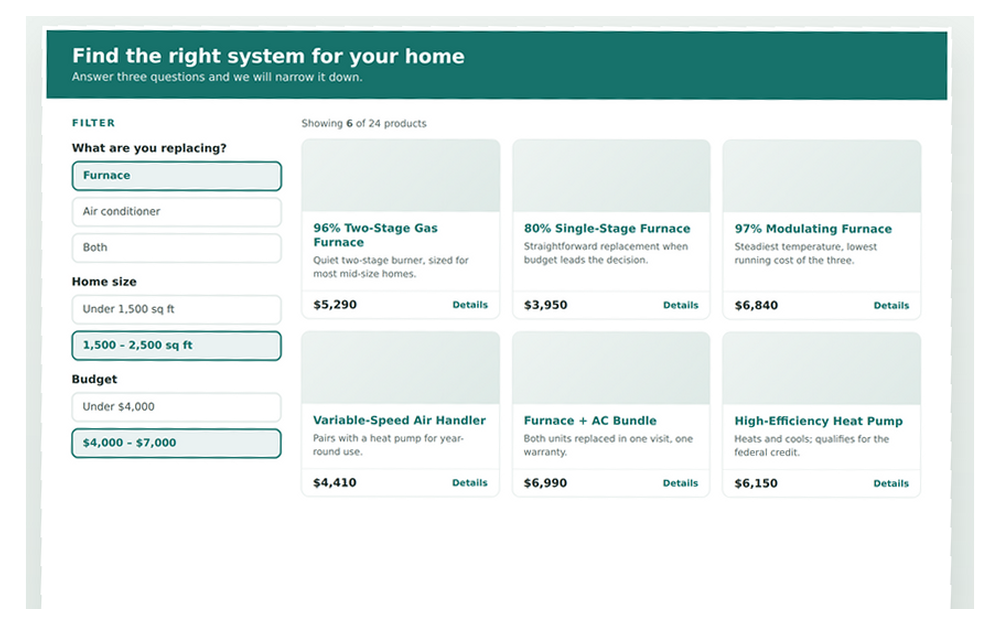
You fill in a spreadsheet with the questions you'd normally ask a customer, and the products that qualify for each answer. Run the build, and it hands back a single, self-contained web page: a question panel on one side, a live list of matching products on the other. Answer a question, and the product list narrows in real time. No product matches every path, and no customer sees options that don't fit them.
Because the logic lives in a spreadsheet instead of code, updating it doesn't require a developer. A new SKU, a discontinued model, a rewritten question: it's a row edit and a rebuild, not a ticket.
What it changes on each side of the counter
- New hires qualify a lead like your best rep does, on day one
- No more relying on memory for which model handles which situation
- A shared shortlist to start the conversation from, not a blank catalog
- Consistent recommendations mean consistent trust, from the phone to the invoice
- Self-service guidance, any hour, on any device
- A short list to compare instead of an entire catalog to parse
- Confidence going into checkout: fewer second-guesses, fewer returns
- A softer, more useful path to your inbox than a bare contact form
The point isn't a fancier form. It's that the sales floor and the website finally recommend from the same source of truth.
That last part is easy to underrate. When the logic lives in one spreadsheet instead of one rep's head and one separate set of website copy, the two channels stop contradicting each other. A customer who talks to a rep and then checks the website sees the same shortlist either way, which is exactly what makes them trust both.
Worth knowing: the finished page is brand-colored, lightweight enough to email, and free to build and share. It does pull its form library from the internet on load, so whoever's using it needs a connection, which is also why the file itself stays small.
Send me the tool
Enter your email and both files are yours: the spreadsheet and a web version to share.
We'll save your email to send the occasional update worth reading. No spam, unsubscribe any time.
There are three levels of North Star and two standalone modules. Picking wrong costs you either money you did not need to spend or a system that does not solve your actual problem.
This tool asks you a handful of questions and tells you which one to buy. It takes about two minutes. It is free, and it will happily tell you to buy the cheapest option or nothing at all.
What the Selector Asks You
The questions are short and none of them are trick questions.
How many people work in your business, counting yourself. What trade or trades you run. How you schedule work today, whether that is a paper calendar, a phone, a shared calendar, or an app. How you invoice today. Whether you can currently tell which job types make you money. Whether customers call your office for things they could look up themselves. Whether you run recurring or contract work. And what is actually going wrong right now, in your words.
That last question matters most. The selector weights your stated problem heavily, because a five-person shop with a scheduling problem and a five-person shop with a visibility problem should not buy the same thing.
You enter your email at the end to get the result. That is the only thing we ask for.
How to Answer So the Result Is Useful
Answer for how things are, not how you intend them to be by spring.
If your scheduling is technically an app but really a group text, say group text. If your invoicing is technically QuickBooks but really you export a spreadsheet and retype it, say spreadsheet. The recommendation is only as honest as the inputs.
On the problem question, name the thing that woke you up at 4am most recently. Missed jobs, unpaid invoices, a tech you cannot reach, a customer who left, a month where you worked more and made less. One specific problem gets you a better answer than three general ones.
How to Read the Result
You get back a primary recommendation, a reason, a price, and usually one alternative.
The primary recommendation names a specific level or module: Core, Plus, or Complete, the Owner Dashboard, the Customer Portal, or Spreadsheet Rescue.
The reason is the part to read carefully. It states which of your answers drove the recommendation. If the reason does not match what you think your problem is, that gap is worth thinking about. It usually means either you answered a question loosely or the thing you have been calling the problem is a symptom of something else.
The alternative tells you what to buy if your situation changes in the next six months, usually because you are about to add people or add a service line.
Sometimes the result is "start with Spreadsheet Rescue" or "you may not need a system yet." Those are real answers, not a soft sell. A shop with two people and clean records does not need a full build, and we would rather tell you that now than have you cancel in month four.
What to Do After You Get Your Result
Three sensible next steps depending on how confident you feel.
If the result matches your gut, take the free audit. It goes deeper than the selector, looks at how your work actually flows, and comes back as a written recommendation with a scope. Still no call required.
If the result surprised you, read the page for what it recommended and see whether the description matches your week. The systems overview lays out all five options side by side.
If your labor pricing is part of what is bothering you, run the loaded labor rate calculator before you buy anything. Some shops discover their real problem is not software, it is that they have been pricing off a number that has not been updated in four years.
Take Two Minutes
Answer the questions and get a straight recommendation with a price attached. No call required.
Common questions
No. You get the result and a follow-up email with the detail. If you want to talk to a person, you have to ask us.
Buy the one you think fits. The selector is a shortcut, not a gate. If you tell us at the audit that you want a different level, we will build that and tell you honestly if we think it is the wrong call.
Yes. Very small shops with simple, working processes get told to wait. So do shops whose records are too disorganized to build on, who get pointed at Spreadsheet Rescue first.